Credentials don't have to be endless lists

A credential is more than a list of keys and values. With Yivi app 8.3.2 the wallet can draw a set of related attributes as one dedicated view. The first credential to get one is the Dutch driving licence: its categories now appear as a table with vehicle pictograms and issue and expiry dates, laid out like the back of the physical card.
The problem with a list of attributes
A wallet knows what a credential contains, but not what it means. For years, the honest way to show a credential was to print every attribute as a label with a value under it, in the order the scheme defines. For an email address or a phone number that works fine. For anything richer, it turns into a long list of attributes that is hard to read.
The Dutch driving licence shows the problem. Each of the sixteen categories on the card, from AM (moped) to T (tractor), is issued as three attributes: whether you hold the category, when it was issued and when it expires. That makes 48 rows on a single credential. Someone who holds only a car licence scrolls past dozens of "No" values and empty dates to find the two that matter. The information is all there, but you can't see what you're allowed to drive at a glance.
We think credentials should be user friendly. You should recognise your driving licence in your wallet as quickly as you recognise the card in your physical wallet.
Step one: hierarchy
The first step came with Yivi 8.0 in June. As part of schema independence, the wallet stopped thinking of a credential as a flat list. Attributes are addressed by their path inside the credential, so a credential can hold nested objects and arrays, and the redesigned credential card shows that structure. An address shows as one group with its street, city and country underneath, instead of as separate unrelated rows. Arrays are numbered and can nest: an organisation credential lists each faculty, each faculty its departments, and each department its courses.
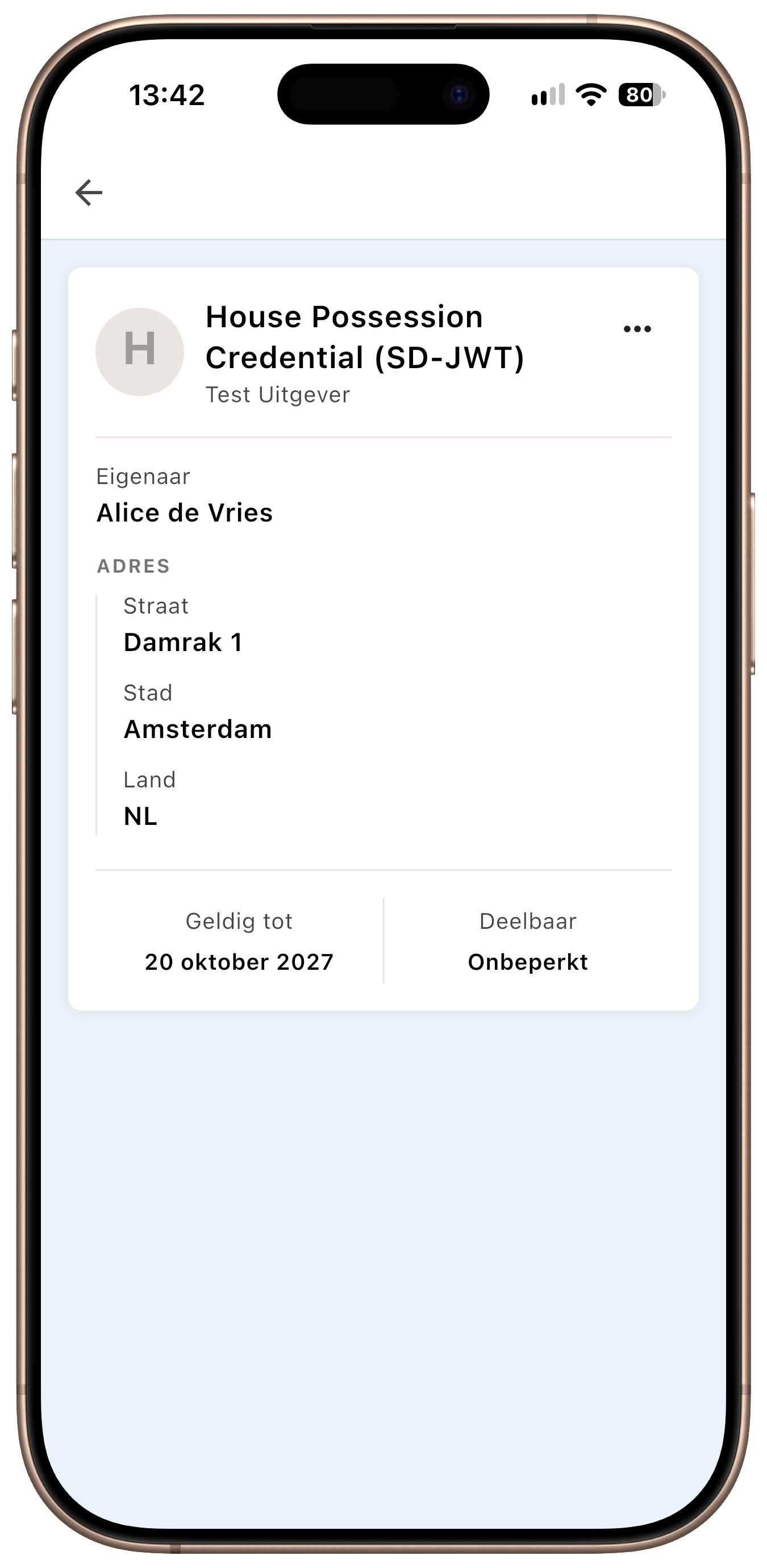
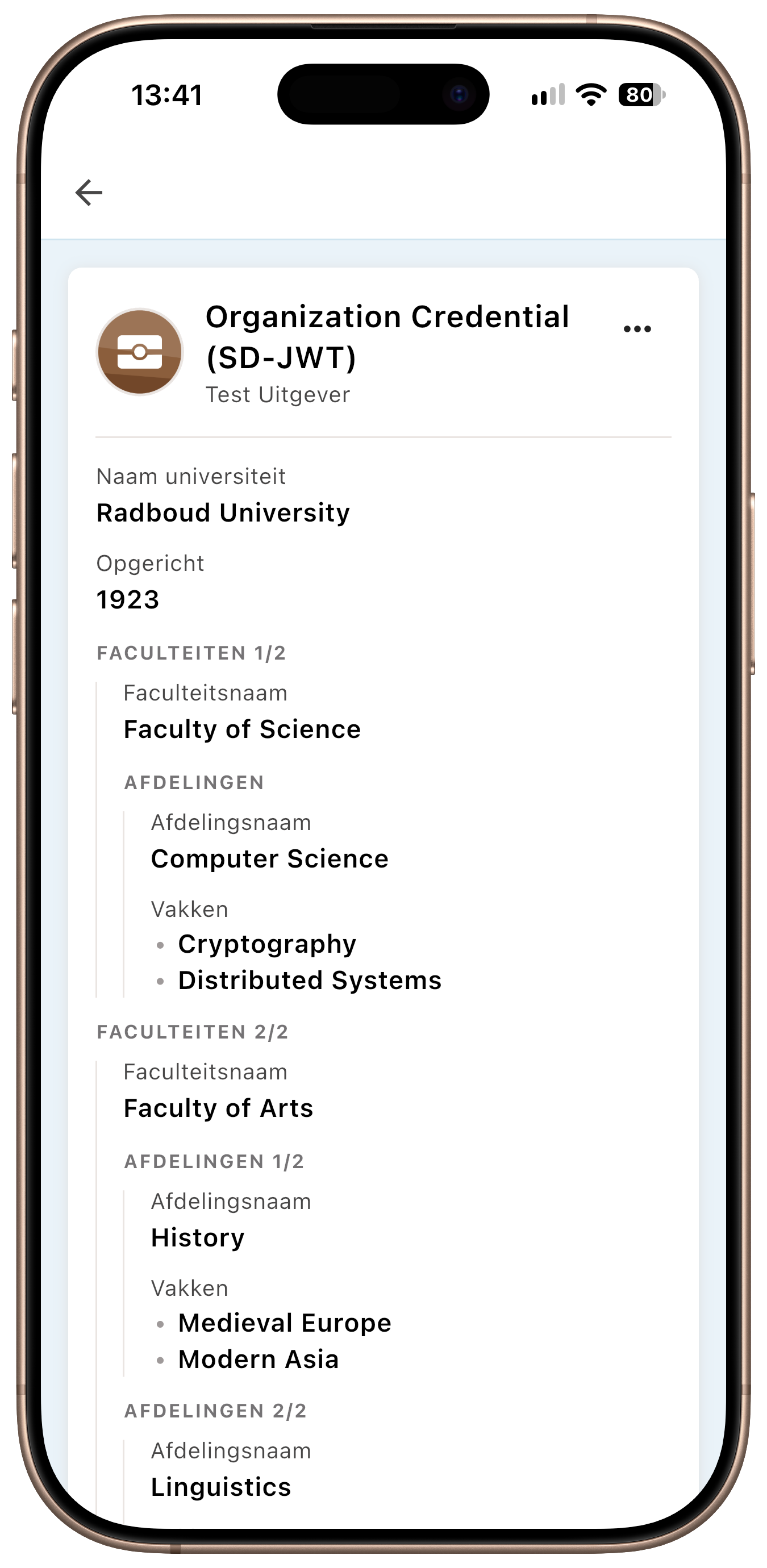
Hierarchy lets an issuer organise information. But it is still a generic layout: every group looks the same whatever it contains. Some information has a shape of its own, and deserves a view that matches it.
Step two: custom attribute rendering
Yivi app 8.3.2, released on 14 October, adds a small rendering system for exactly that. A credential type can register one or more attribute group renderers. A renderer looks at the attributes being shown, picks the ones it knows how to draw, and returns them as a single widget. Everything it does not pick stays in the ordinary attribute list, so a renderer only changes the part of the card it knows about.
A few design rules make this safe to use across the app:
- A renderer shows exactly what it claims, and nothing more. A renderer receives only the attributes that are on screen. On a disclosure screen, and in the activity log, that is only what is being shared with the verifier. A custom view can never suggest you are sharing more than you are.
- It decides where it sits on the card. A group can be placed at the top, directly after a named attribute, at the bottom of the ordinary rows, or below the images. If the attribute it is anchored to is not part of a disclosure, the group falls back to the position its own first attribute would have had.
- It keeps the comparison colouring. When the app compares values, for instance to show which values of a credential changed on reissuance, the renderer colours its own attributes as matching or different, just like ordinary rows.
- Renderers chain. A credential type can have several renderers. Each one sees only what the previous ones left unclaimed, so they never fight over the same attribute.
Renderers are registered per exact credential type identifier and are part of the app itself, reviewed and shipped like any other code. An issuer cannot push rendering code to your phone. That is a deliberate choice: what the wallet shows you on a disclosure screen has to be trustworthy, so the code that draws it is ours, open source, and tested.
First application: driving licence categories
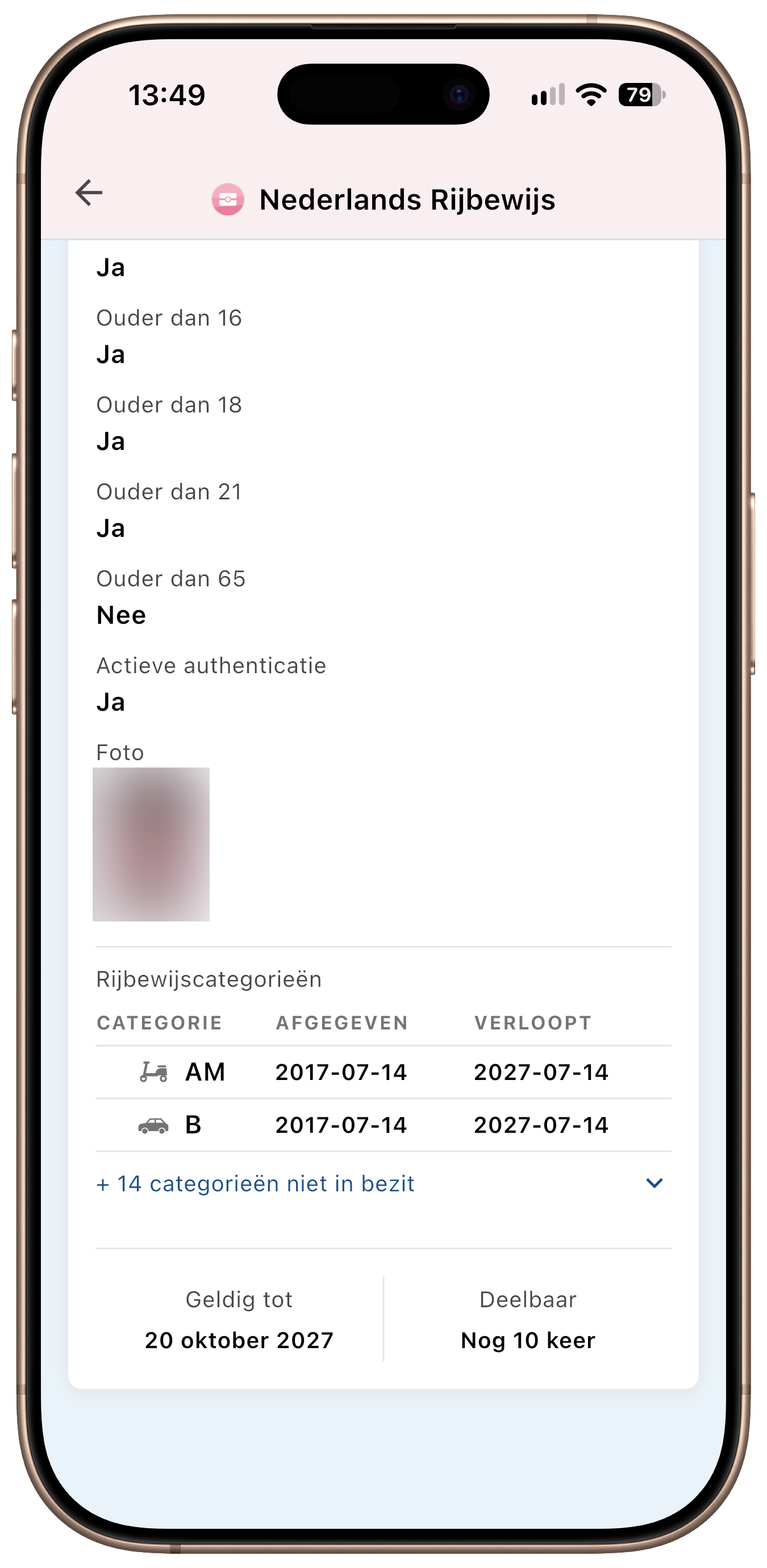
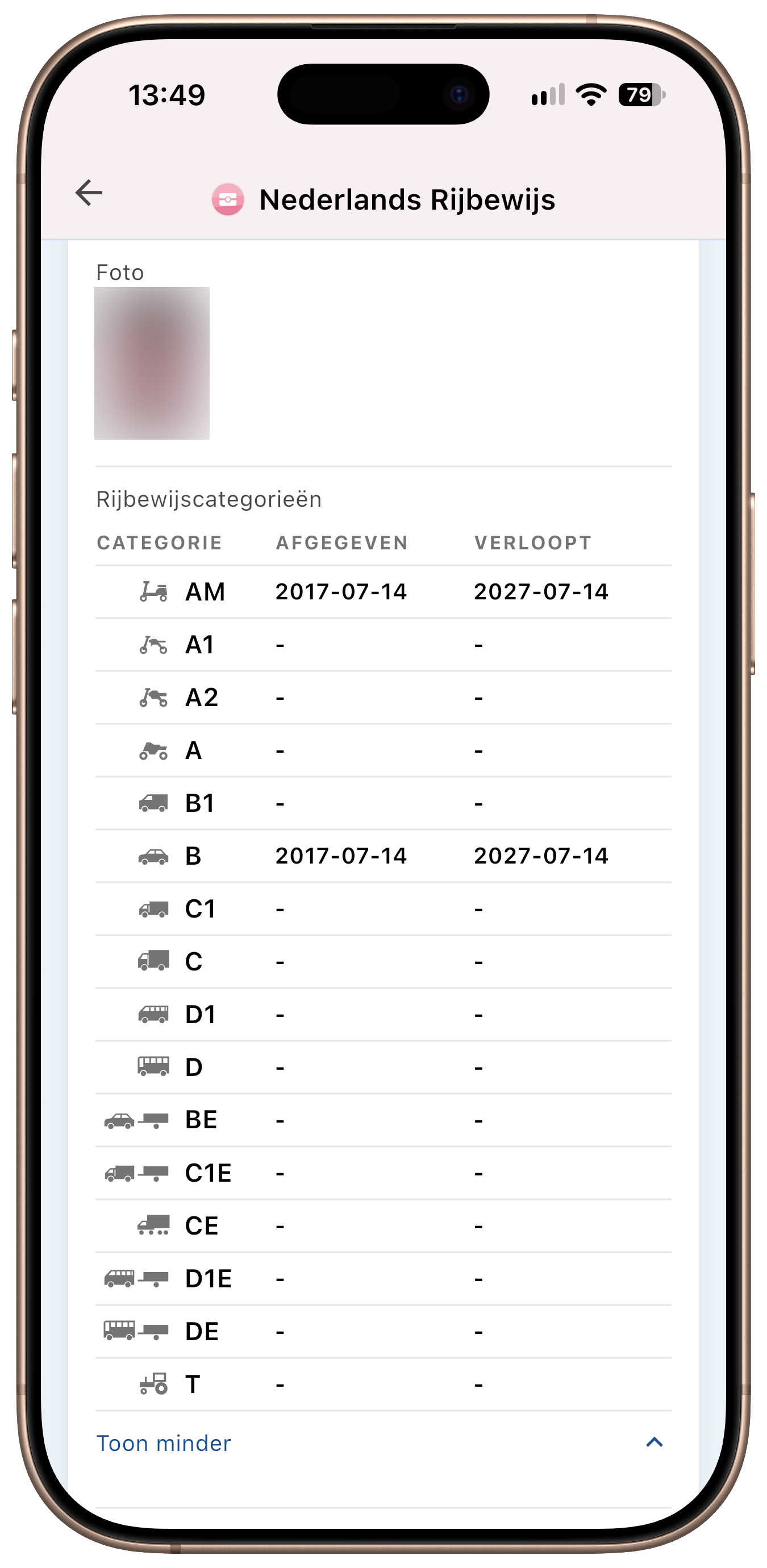
The first renderer is for the Dutch driving licence credential (pbdf.pbdf.drivinglicence, together with its staging and demo counterparts). It replaces the 48 category rows with a single table titled Driving licence categories, laid out like the back of the card:
- Category, with a vehicle pictogram next to the code: a moped for AM, a car for B, a truck for C, a bus for D, a tractor for T, and so on. Combination categories such as BE, C1E and DE show the vehicle with a trailer.
- Issued and Expires, the dates for that category.
- A category you do not hold shows "-" for its dates, just as the physical card does.
The categories follow the order of the licence card: the rows of the EU model licence from Directive 2006/126/EC, plus the Dutch T category.
Only what you hold, until you ask for more
Most people hold two or three categories. On the credential detail screen, the table therefore starts collapsed to the categories you actually hold, and ends with a row such as "+ 14 categories not held". Tapping it expands the rest in place, and the screen scrolls so the table header stays in view. Tap again to show less.
If you hold every category, or none, there is nothing to hide and the table shows in full. If the chip on the licence carried no category data at all, the table says "No category information" instead of showing sixteen empty rows.
On a disclosure, only what is asked
When a verifier asks for driving licence categories, the table adapts to the request. It never collapses on a disclosure, because it shows exactly the categories being shared. It only shows the date columns that were requested. If the verifier asks whether you hold a category but not for any date, the table shows a Status column with Held or Not held instead. A car-sharing service that only needs to know you hold category B sees one row. You see the same one row before you agree to share it.
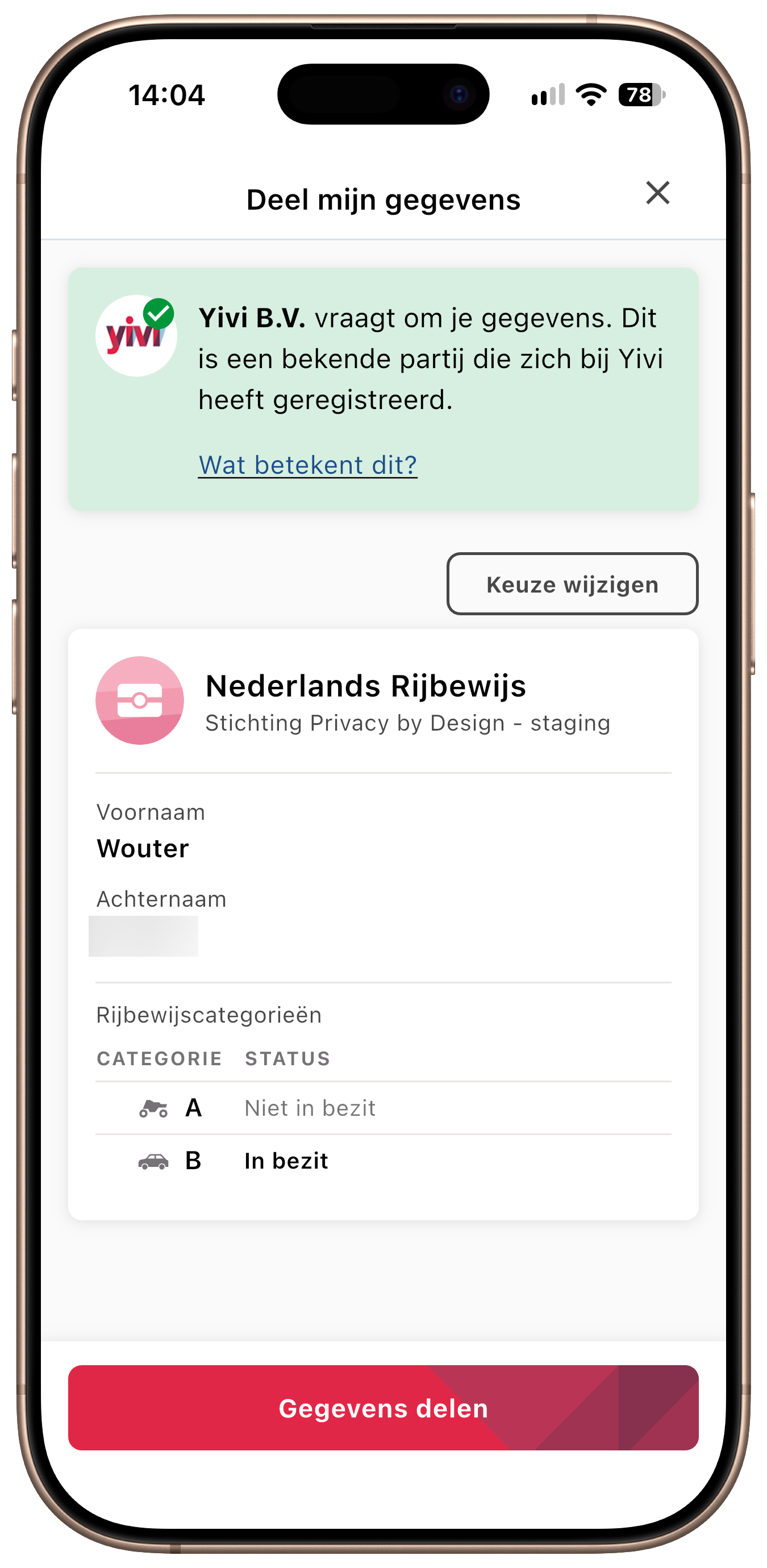
The same view is used in the activity log, so a disclosure you made last week reads the same way it did when you approved it.
What developers and organisations should know
| Available in | Yivi app 8.3.2 and later, App Store, Google Play and F-Droid |
| Credential types | pbdf.pbdf.drivinglicence, pbdf-staging.pbdf.drivinglicence, irma-demo.pbdf.drivinglicence |
| Attributes covered | categoryX, categoryXDateOfIssue, categoryXDateOfExpiry for AM, A1, A2, A, B1, B, C1, C, D1, D, BE, C1E, CE, D1E, DE and T |
| Changes for verifiers | None. Requests and disclosed values are unchanged; only the way the wallet presents them changed |
| Changes for issuers | None. The credential type and its attributes are unchanged |
For anyone working on the app: renderers live under yivi_core/lib/src/widgets/credential_card/attribute_groups/, and the registry in attribute_group_registry.dart maps a credential type identifier to its renderers. The driving licence renderer and table are a good starting point for a new one, including the widget and integration tests that cover issuance, the detail screen, disclosures and the activity log.
What comes next
The driving licence is the first credential where a custom view clearly beats a list, but it will not be the last. Diplomas with a list of results, insurance policies with coverage details and other multi-part credentials can benefit from the same approach. Alongside this, 8.3.3 already uses display hints to show amounts as currency in your own language, a smaller step in the same direction: show values the way people expect to read them.
Is there a credential in your Yivi wallet that is hard to read? Let us know which one, and what you would like to see.